

How to Pay in Colombia With WanderWallet Using Bre-B
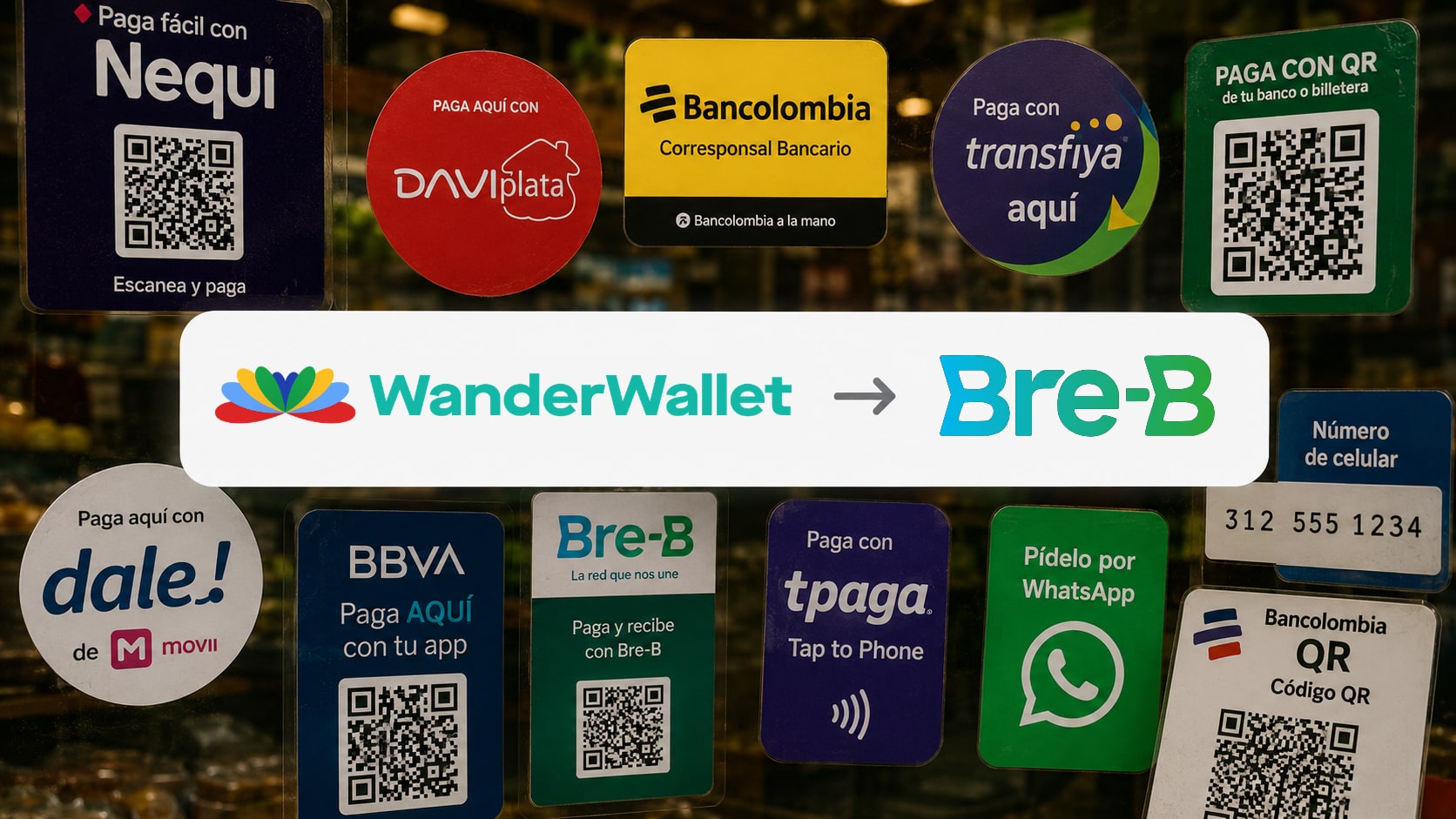
Paying in Colombia can feel confusing because merchants may say Nequi, Daviplata, Bancolombia, Bre-B, transfer, QR, or simply give you a phone number. Underneath, almost all of it now runs on Bre-B, Colombia’s instant-payment system, and WanderWallet’s Colombia flow lets you pay through it two ways, without a Colombian bank account.
TL;DR
- Two ways to pay: scan a Bre-B QR, or send a direct transfer to the merchant’s payment key.
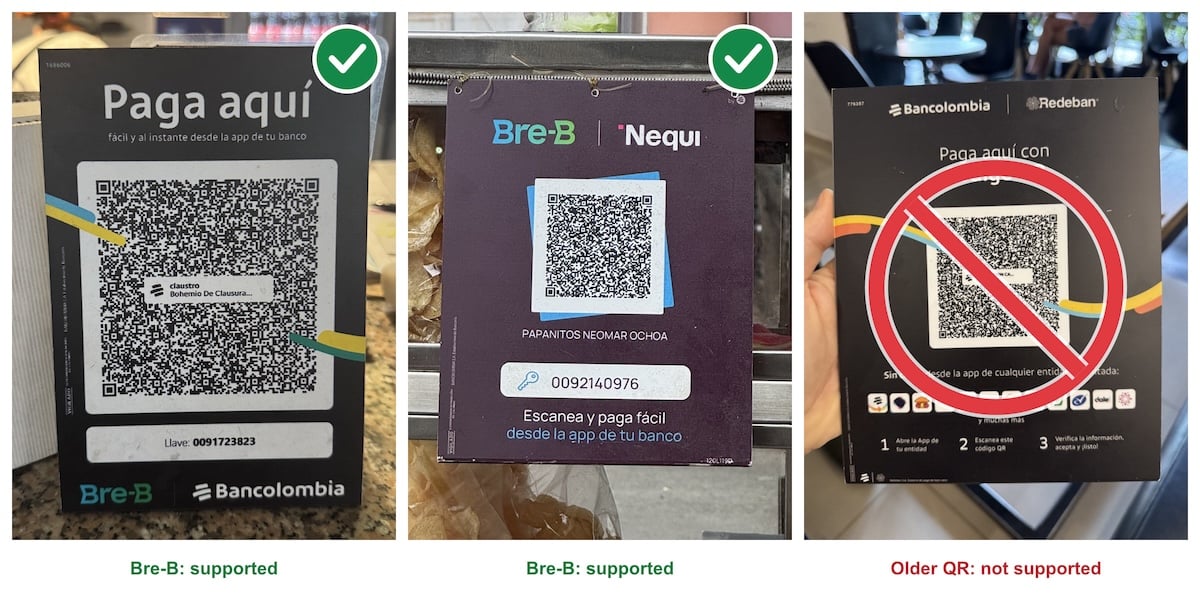
- QR: major terminal providers support Bre-B QR payments across Colombia; participating terminals can show one on screen. Say “quiero pagar con QR.” Printed labels work when they say Bre-B.
- Direct transfer: ask for the merchant’s key (their “llave”), usually a phone number or a business ID. If they say “solo Nequi” or “Daviplata,” ask for the phone number anyway.
- Either way, WanderWallet shows the recipient name, the amount in pesos, and the final cost shown in WanderWallet. Confirm only if the name matches.
- Bre-B itself does not add a separate fee for the sender or merchant in the flow described here. WanderWallet’s conversion and payment fees still apply and are shown before you confirm.
Before You Pay: The Words You Will Hear
At checkout in Colombia, locals may use different words for digital payments. The important thing is to understand what each word usually means in practice.
| What They Say | What It Usually Means | What To Do |
|---|---|---|
| Bre-B | Colombia’s instant-payment system | Scan the Bre-B QR, or ask for the payment key |
| Llave | The payment key linked to the recipient | Ask for it: usually a phone number or business ID |
| Nequi | A popular Colombian wallet | Ask for the Nequi number; it usually works as the Bre-B key |
| Daviplata | A popular Colombian wallet | Ask for the Daviplata number; same idea |
| Bancolombia | A major Colombian bank | Scan their Bre-B QR label, or ask for the key |
| QR | A code on the card terminal or a printed label | Scan it. If it is not a Bre-B QR, the app tells you |
If you want the background, read What Is Bre-B? Colombia Payments Explained for Travelers. This how-to is the practical version: what to do when you are standing at the counter.
Option 1: Pay a Bre-B QR
This is the fastest way, and the one most visitors do not know exists. Major terminal providers support Bre-B QR payments across Colombia. Ask whether the merchant can display one on their terminal. Supermarket self-checkouts have the same option. Many small shops also have a printed Bre-B QR label next to the register.
- Say “quiero pagar con QR.” The cashier shows the QR on the terminal screen, or points you to the printed label.
- Open WanderWallet, tap Scan, and scan the Bre-B QR. For a static printed QR, enter the amount in Colombian pesos.
- Check the recipient name. For a terminal QR this is the store; for a printed label it is the business or the owner.
- Review the amount in pesos and the final cost shown in WanderWallet, including the exchange rate and any fee.
- Confirm the payment, wait for it to show as completed, and check receipt with the merchant. Keep the receipt in the app in case they ask to see it.
If the QR is not a Bre-B QR, WanderWallet tells you it is not supported and nothing is charged. Older printed labels from before Bre-B are being replaced by the banks, merchant by merchant, so this will happen occasionally. When it does, use option 2.
Option 2: Send a Direct Transfer via Bre-B
Use a registered Bre-B key linked to a participating Colombian bank or wallet account. This can cover rent, deliveries, small shops with no terminal, tour guides and taxis.
- Ask the merchant for their Bre-B key: “Me da su llave de Bre-B?”
- If they say Nequi, Daviplata, or Bancolombia instead, ask for the phone number or the ID they use there. It works through Bre-B only if it has been registered as a Bre-B key.
- Open WanderWallet and go to Transfers -> Colombia Bre-B Transfer.
- Enter the key and the amount in Colombian pesos.
- Review the recipient name, amount, exchange rate, and fee.
- Confirm only if the recipient name matches the merchant.
- Show the confirmation screen if the merchant asks to see it.
The key habit is simple: do not confirm a payment just because the number looks plausible. The recipient name is your safety check.
For personal Bre-B payments in Colombia, the recipient name may be partially masked for privacy. For example, “Johnny Sebastian Bravo” may appear as “J**** S****** B****”. That is normal. Use the visible initials and the merchant’s confirmation together, and do not continue if the masked name clearly does not match what they told you.
What to Say at Checkout
You do not need a long explanation in Spanish. These short phrases cover most situations.
| Spanish | Meaning |
|---|---|
| Quiero pagar con QR | I want to pay by QR |
| Me da el QR de Bre-B, por favor? | Can you show me the Bre-B QR? |
| Me da su llave de Bre-B? | Can you give me your Bre-B key? |
| Me puedes dar tu numero de Nequi / Daviplata? | Can you give me your Nequi / Daviplata number? |
| A que nombre debe salir? | What name should appear? |
| Es este el nombre correcto? | Is this the correct name? |
In a real checkout, the merchant may not say “Bre-B” even if their number works through Bre-B. They may keep using the payment language they already know.
If the Merchant Says “Solo Nequi”
A merchant may say “solo Nequi” and give you a phone number. That does not mean the payment is trapped inside Nequi.
Many people in Colombia still describe payments by the app name they use every day: Nequi, Daviplata, Bancolombia, or another local wallet or bank. If that phone number is registered as a Bre-B key, which is common, it works as a direct transfer in WanderWallet.
So the practical move is: ask for the Nequi or Daviplata number, enter it as the recipient key, check the recipient name, and pay if it matches. If the name does not match, stop and ask again.
Safety Checklist Before You Confirm
- Confirm the merchant gave you the right key, or that you scanned their QR and not a neighbor’s label.
- Check the recipient name in WanderWallet before paying. If the name is masked, compare the initials and ask the merchant to confirm.
- Do not confirm if the name looks wrong or unfamiliar.
- Ask the merchant to repeat or write the number if you are unsure.
- Keep the payment confirmation until the merchant confirms they received it.
Local digital payments are fast, so the review screen matters. Slow down for a few seconds before confirming.
When to Use a Card, and When Cash
WanderWallet is built to reduce the need for both, not to pretend Colombia has one perfect method everywhere. A few tiny merchants may still prefer cash, and a few will have neither a key nor a QR handy. If you do use a foreign card, choose to be charged in pesos, not dollars.
Related Guides
- How Dynamic Currency Conversion Works in Colombia – the dollars-or-pesos prompt explained.
- How I Pay in Colombia: Bre-B Transfers and QR – Vojta’s day-to-day experience in Medellin.
- What Is Bre-B? Colombia Payments Explained for Travelers – the explainer for Bre-B, payment keys, Nequi, Daviplata, Bancolombia, and QR.
- WanderWallet Colombia – the Colombia page.
Frequently Asked Questions
Can I pay a Nequi merchant with WanderWallet in Colombia?
In many cases, the useful thing to try is the merchant’s Nequi phone number as a Bre-B llave. If the number is registered and the recipient name matches, the payment may work through the Bre-B flow. It will not work for every number.
What should I ask for if the merchant does not know Bre-B?
Ask for the number or payment key they use for Nequi, Daviplata, or Bancolombia. Many merchants will keep using the app name they know, even when the identifier can also work as a Bre-B llave.
Why does WanderWallet ask me to check the recipient name?
The recipient name confirms that the llave or phone number points to the right person or business. For personal Bre-B payments, the name may sometimes be partially masked, such as J**** S****** B****. Do not confirm if the initials or visible name details do not match what the merchant told you.
Do I need a Colombian bank account to use WanderWallet in Colombia?
No. WanderWallet is designed for travelers who need to pay through local payment rails without opening a Colombian bank account.
Ready to Start Paying with QRs or Pix?
Download WanderWallet and pay like a local.


About the Author

Milo
Milo writes about the stuff nobody tells you before you land: why your card gets declined, where cash still rules, and how to actually pay for things without getting ripped off. He's WanderWallet's resident payment nerd.